The effortless live TV & IPTV player for Windows 10 and 11

All your favorite TV and series.
Zero clutter. Pure enjoyment.

Say goodbye to clunky media players and frustrating setups. TeeVee Player brings live TV channels, a crystal-clear electronic program guide (EPG), and smooth series playback into one fast, lightweight desktop app designed for pure viewing comfort.
⚡ Instant startup 🛡️ 100% Free & ad-free 🛋️ Lean & distraction-free
TeeVee Player – Pure Viewing Comfort
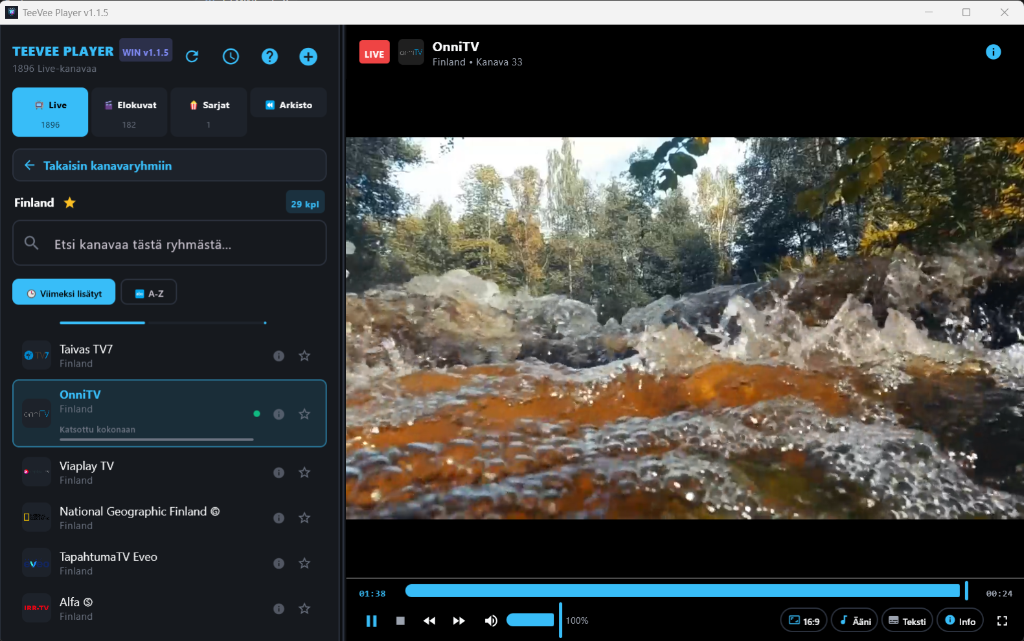
TeeVee Player selkeä soittonäkymä

Everything you want from TV. Nothing you don't.

Most IPTV apps are burdened with confusing menus and outdated interfaces. We rebuilt the desktop TV experience around speed, simplicity, and rock-solid reliability.

Lightning-Fast Zapping
⚡

Channel switching at the speed of thought

No long buffering spinners or audio delay. Click any channel or use the dedicated next/previous buttons (|◄ / ►|) for instant live zapping.

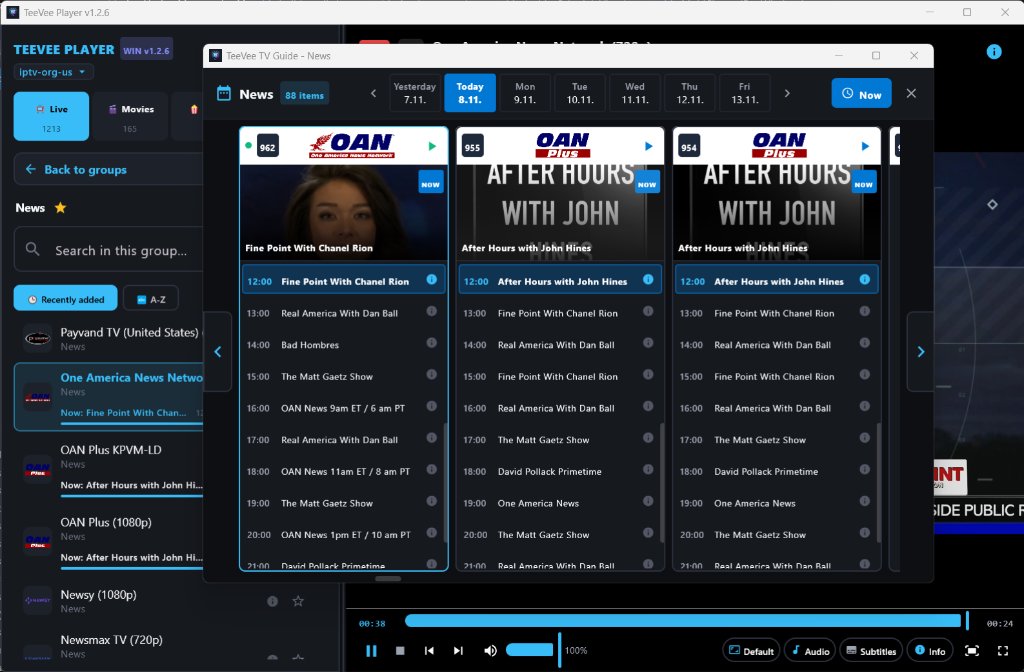
Multi-Channel TV Guide
📺

Side-by-side group schedule timeline

The new large multi-channel guide displays all group channels along a clean timeline. Features automatic 'Now' centring, show posters, and synopses.

Channel Customization & PIN
🔒

Custom ordering and parental control

Drag channels to any position with your mouse, rename channels, hide unwanted ones, and perform batch operations. Secure sensitive groups with a 4-digit PIN.

Series, Movies & Trailers
🍿

Cinema experience and binge-watching

Rich metadata, posters, descriptions, and one-click official trailers in your browser. Smart memory always resumes at the exact second.

Fullscreen & GPU Acceleration
🖥️

LibVLC Direct3D11 hardware decoding

Modern LibVLC 3.0.24 engine unleashes full graphics card (GPU) power. Silky-smooth 4K playback with minimal CPU load and distraction-free F11 cinema mode.

Silent & Reliable
🌱

Seamless background updates

Playlists update silently in the background without interruptions. Built-in updater notifies you of new versions directly in the top bar.

Multi-channel TV guide with timeline view

Browse schedules across all channels in your category side by side. The guide automatically centers on currently airing shows, dims past broadcasts, and presents full upcoming lineups.

  • Visual program thumbnails fetched automatically from Wikipedia, TVMaze & Cinemeta
  • 7-day schedule with instant one-click access to yesterday's catchup archive
  • Instant "Now" button smoothly centers the guide to the present moment
Multi-Channel EPG TV Guide

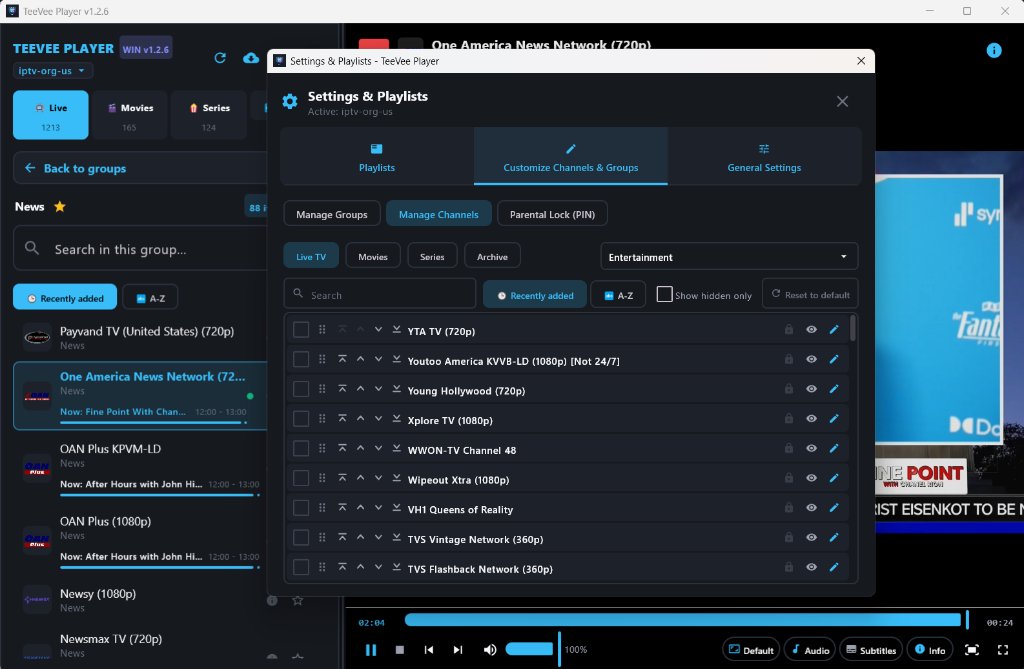
Custom channel ordering, batch actions & parental PIN

Organize your channels exactly your way. Drag channels into custom order, batch-hide clutter, rename items, and safeguard sensitive channels with a 4-digit PIN.

  • Effortless drag-and-drop reordering with smooth list auto-scrolling
  • Batch checkboxes with Shift-select for rapid multi-channel management
  • Parental PIN lock keeps designated categories and adult streams secure
Channel Customization and Parental Lock

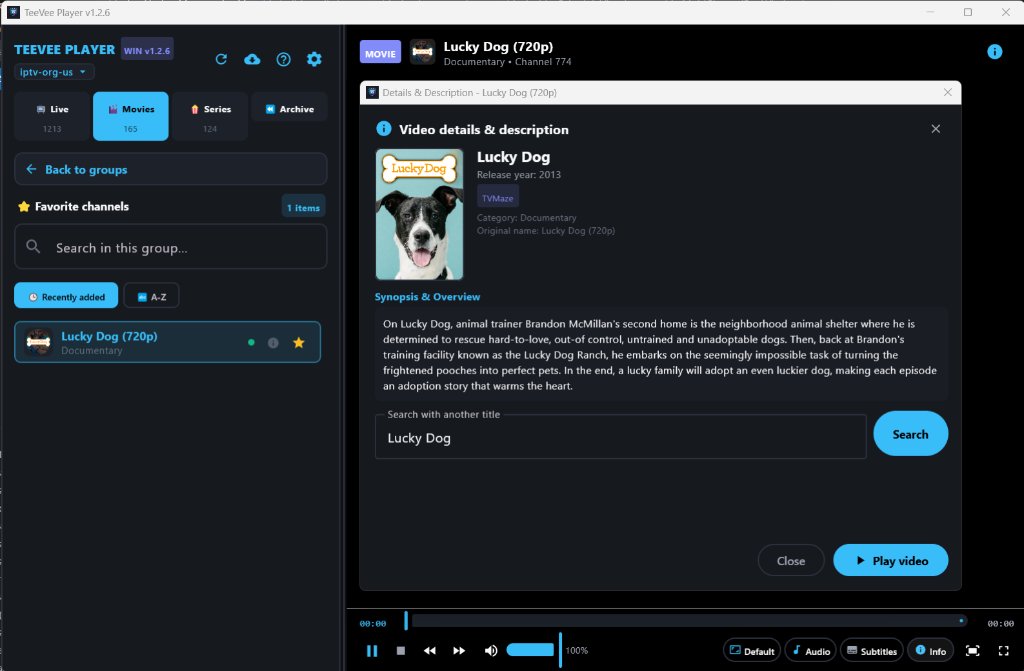
Rich movie metadata, trailers & binge-ready series

Explore movies and TV series in stunning detail. Check official descriptions and ratings, preview official trailers with a single click in your browser, and enjoy seamless playback.

  • Official movie trailers open in your default browser with a single click
  • Smart playback memory resumes series and movies at the exact second
  • Multilingual subtitle support (DVB, Teletext, SRT, WebVTT) with quick sync
Movie Details and Trailer

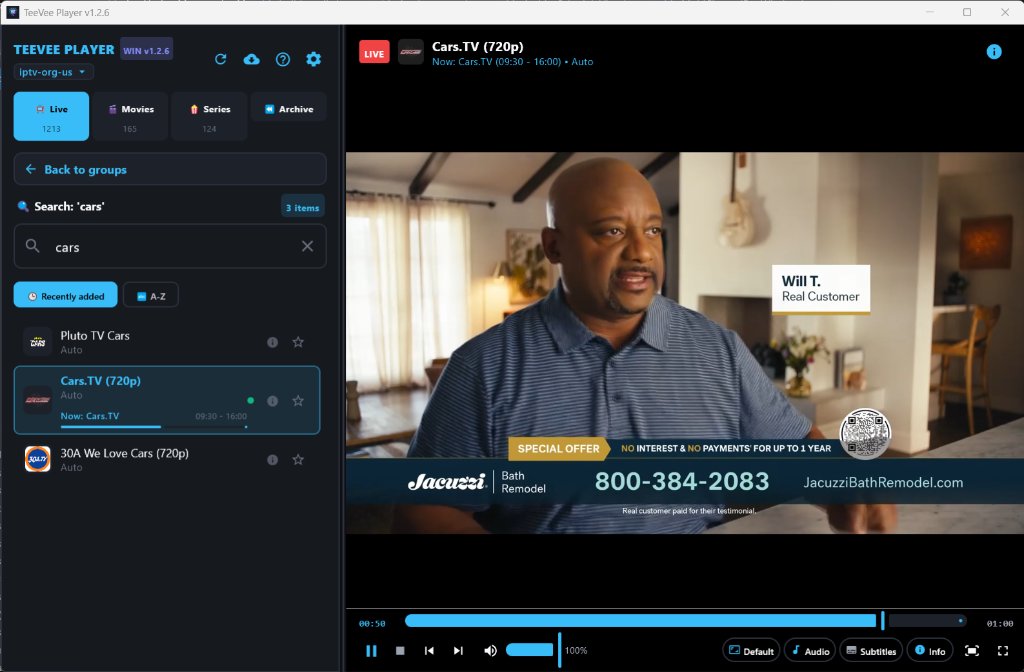
Find anything instantly across thousands of channels

Navigating through huge playlists is effortless. Real-time search instantly filters channels, movies, and series as you type, with classic previous/next channel zapping.

  • Real-time search filters 50,000+ items with zero delay
  • Previous and next channel controls (|◄ / ►|) for authentic TV zapping
  • Clean favorites and watch history with automatic deduplication
Instant Search and Playback

Up and running in two minutes

No technical know-how or complex network setup required. TeeVee Player works straight out of the box.

01

Download and install

Download the official Windows installer below. Setup takes just a couple of clicks, with all media engines and codecs bundled inside.

02

Connect your playlist

Paste your M3U link, load a playlist file, or log in with Xtream Codes. Channels, categories, and TV guides populate automatically.

03

Sit back and enjoy

Select your favorite channel, hit F11 for fullscreen, and enjoy your favorite live TV and series with rock-solid performance.

Ready for a better TV experience?

Safe, lightweight, and built natively for Windows 10 and Windows 11.

Full Windows Installer Package

Creates desktop and Start menu shortcuts automatically. Everything needed for smooth playback is included in a single package.

  • Version: Latest official release
  • Compatibility: Windows 10 & 11 (64-bit)
  • Package format: Windows Installer (.msi)
  • License: 100% Free for personal use

All-in-one standalone app

No third-party media players (like VLC), browser extensions, or codecs to install. Everything you need is integrated directly into the player.

What you'll need

• A standard Windows 10 or 11 PC (64-bit)
• An active internet connection
• Your own IPTV playlist (M3U URL, file, or Xtream Codes login)

☕

Support Independent Development

TeeVee Player was built out of passion for clean, hassle-free TV viewing. The app is completely free of ads, tracking SDKs, and monthly subscriptions. If TeeVee Player brings joy to your everyday life and you'd like to support ongoing development and hosting, you can buy the developer a coffee via PayPal!

Buy a Coffee (PayPal)
Have questions, bug reports, or feature suggestions? teevee.jannejb@gmail.com

Frequently Asked Questions

Answers to common questions about installation, playlists, and performance.

Because TeeVee Player is a newly released independent application, Windows Defender SmartScreen may display "Windows protected your PC". This is standard behavior for new releases without an expensive enterprise certificate.

How to proceed in 2 clicks:
1. Click the small "More info" link in the dialog.
2. Click the "Run anyway" button that appears.
Installation will proceed immediately. The installer is 100% clean, verified, and free of any malware or adware.
No, it does not. TeeVee Player is a high-performance playback client (just like a physical television screen or computer media player). It does not provide or host copyrighted streams. You simply connect your own IPTV service or legal playlist (via M3U URL, local file, or Xtream Codes login).
Importing is effortless. You can paste your provider's M3U / M3U8 URL, select a downloaded playlist file from your PC, or log in with Xtream Codes (server URL, username, and password). The app automatically parses your channels, categories, and XMLTV program guide.
Completely seamlessly! TeeVee Player automatically checks for new releases on startup and displays an update badge in the top bar whenever a new version is available. You can download and install the latest update with a single click directly inside the app—no manual reinstalling required. All your saved favorites, playlists, and watch history are preserved automatically.

While the user experience is designed to be completely effortless, the engine is powered by industry-grade desktop technologies:

  • Native Desktop Application: Built with modern Kotlin and JetBrains Compose Multiplatform Desktop. Unlike memory-heavy Electron wrappers, TeeVee Player boots in seconds and uses minimal CPU and RAM.
  • DirectX 11 Hardware Acceleration: Powered by LibVLC with Direct3D11 GPU rendering. Video decoding is fully offloaded to your graphics card, keeping CPU load minimal and playback silky-smooth even in 4K resolution at 60 fps.
  • Blazing-Fast Local SQLite Database: EPG schedules, channels, and watch history are indexed locally. This enables instant filtering and search across tens of thousands of channels with zero interface lag.
  • Broad Protocol Support: Full compatibility with HLS (M3U8), MPEG-TS, Xtream Codes API, XMLTV guides, and automatic OpenSubtitles subtitle fetching.
  • Privacy-First & Clean: 100% free of ads, tracking SDKs, and telemetry. Your playlists, credentials, and viewing habits remain strictly private on your computer.
Legal Disclaimer

TeeVee Player is an independent media player application. It does not provide, host, rebroadcast, or distribute any media content, television channels, movies, or series. Users are solely responsible for providing their own lawful content and complying with applicable copyright laws and provider terms. The developers of TeeVee Player are not affiliated with any third-party IPTV service providers.